This does not apply to remote keys for the E60/E61 5-series or E63/E64 6-series which do not require any key syncing except for putting the key into the ignition once . For all other cars that use the diamond shaped remote key or the rubber button key continue reading.
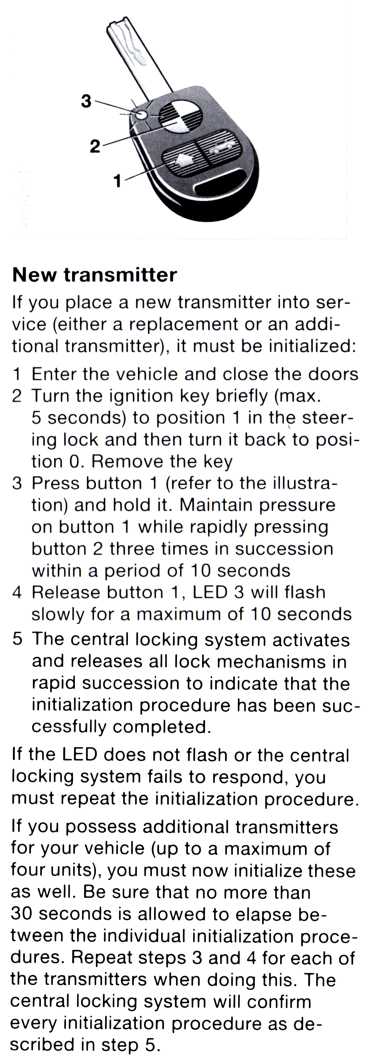
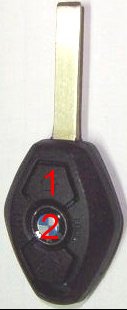
If for some reason your car forgets the key's remote id then it will need to be resynced. Below are the steps to resync the key to the car. The procedure below is scanned directly from the BMW owner's manual. BMW is not trying to keep this a secret so they can make money doing it for you. It says for New transmitters, but, it works for old transmitters as well. The procedure is the same for the newer diamond shape keys, just remember that Button 1 is the unlock button (the button closest to the key blade) and Button 2 is the lock button (center button with the BMW logo). Have all the keys with you when doing the resync procedure. Keys not synced will be forgotten by the car and the remote will no longer work! This procedure is for the remote keyless entry only and has NOTHING to do with the ability to start the engine. It will not fix keys that do not start the engine and won't mess up a key so that it won't start the engine. Old Key/New Key information.
Frequently asked questions
1 - When the procedure says to close the doors it just means the passenger compartment doors. It does not mean the hood, trunk or convertible top.
2 - Position 1 in the steering lock is the Accessory position, but, turning to Position 2, the ON position, also works. Just do not turn to START.
3 - Step 3 says rapidly pressing button 2 three times in succession. It should not be done too rapidly. 1-2 seconds between presses is fine. Step 3 just needs to be completed within 10 seconds.
4 - Diamond shape keys do not have an LED so disregard this part in Step 4.
5 - The order in which the keys are initialized is not critical. If they are not initialized in the same order as they were originally the key memory functions will not be assigned to the correct key. Try repeating the whole resync procedure, but, sync the keys in a different order.